- systematic review software
- 11 min read
- By George Burchell
- View publications on PubMed
- ORCID
Best systematic review software (an honest fit guide)
There is no single best systematic review software. A student with a small set of abstracts and a team writing a regulatory report are shopping for different things. This page says who each real product is best for, and who should pick something else.
Disclosure: we make SystematicReviewTools.app, Study Screener and Evidence Table Builder. We include them where they fit and say where other tools are the better choice.
Feature facts below come from each vendor’s own site (verified Oct 2026). Nothing here is a score, a rank, or a time-saved percentage. The best-for and not-ideal-for lines are our editorial judgement about fit. How the stages hand off is already mapped in literature review software by stage; this post does not repeat that map.
Where SystematicReviewTools.app fits
Best for: a reviewer who wants free, single-purpose tools for one stage at a time. On this site that means a research gap check, protocol notes, a PRISMA checklist, PubMed search blocks, syntax translation, the search block library, RIS/MEDLINE deduplication, a PRISMA flowchart, and a manuscript outline. Search Builder’s page says the tool is free. The deduplication page states a measured upload cap of 10 RIS or PubMed/MEDLINE files and 50 MB combined. The source is that page’s own upload rule. Uploads are not kept after processing. See how dedupe feeds PRISMA counts and PROSPERO registration for the steps that are still yours, not the software’s.
Not ideal for: an end-to-end audited team manager. This app does not run blinded dual screening, disagreement resolution, PDF extraction, or in-app risk-of-bias appraisal. The screening tools page is the handoff for title-and-abstract decisions: the dashboard sends that work to Study Screener, where you upload a RIS file, highlight keywords, label Include / Maybe / Exclude, and export CSV or RIS. Reconcile a second reviewer outside that queue if the protocol requires it. The evidence table tool page is the handoff for PDF extraction, which runs in Evidence Table Builder. If the review needs dual independent decisions, blinding, and conflicts stored in the same project, Covidence is the better fit.
Covidence
Covidence describes itself as one place for review setup, reference import, screening, data extraction, quality assessment, and export. Its site says duplicates are removed before screening, independent dual screening with blinding and structured conflict resolution is standard, full-text exclusion reasons are captured as you work, extraction templates can be reused, suggestions point at the source text and a person confirms each value, and risk of bias sits in the same workflow. The same page says screening “surfaces likely includes earlier,” and it lists “Trusted AI & automation” that automates where the team stays in control. Extracted data and a PRISMA-aligned flow diagram are exported from those decisions. It is owned by the Future Evidence Foundation, a non-profit.
Best for: a health or social-science team that wants the usual Cochrane-style path (dual screen, conflicts, extraction, appraisal, PRISMA export) in one project, especially where an institution already provides access.
Not ideal for: writing and translating the database strategy. Do that in the Search Builder and Search Translator, then import the file. Also a poor fit if you need source code you can inspect: ASReview is the better fit for that reader.
Rayyan
Rayyan lists the workflow as import, invite collaborators, deduplicate, title and abstract screening, full-text screening, data extraction, risk of bias, and reporting. That page says every decision is fully traceable, and that structured workflows include auto-generated PRISMA diagrams and complete audit trails. It also lists AI-assisted prioritization, and ResearchPilot features that include an AI Reviewer and Auto-Extract Data (the same line names an AI Analyzer and zero-shot relevance ratings). A mobile app is listed. The page says basic use is free forever and does not need a card. The “up to 200,000 references” deduplication figure is measured from that page: it is Rayyan’s stated auto-resolver limit.
Best for: a lab or student team that wants collaborative screening, a fully traceable decision history, and the free basic use Rayyan describes.
Not ideal for: an organization that must reuse extracted evidence across many regulatory projects with configurable forms. DistillerSR is the better fit for that reader.
DistillerSR
DistillerSR describes a configurable, auditable literature-review workflow aimed at organizations that repeat reviews (its examples include medical devices, pharmaceuticals, and guidelines). The site says the platform keeps an audit trail and version control, can schedule imports from PubMed, Embase, and RightFind, and offers an API. On screening, it describes re-ranking from the team’s include and exclude decisions, classifiers, and checks that flag excluded records resembling includes. On extraction, it says suggestions are tied to the source document and a person accepts or rejects each value.
Best for: a company or guideline group that runs many reviews, needs a configurable workflow, and has to show who extracted what.
Not ideal for: a one-off student review when open-source screening, or the free basic use Rayyan describes, is enough. Rayyan or ASReview is the better fit for that reader.
EPPI-Reviewer
EPPI-Reviewer is built by the EPPI Centre at UCL. The product page says it covers systematic reviews, meta-analyses, narrative reviews, and meta-ethnographies, including very large reviews, and that version 6 runs in a browser, including on a phone or tablet. Cochrane reviewers can sign in with Cochrane credentials at no charge (it is described as a recommended Cochrane review-production tool). Campbell reviews can be run at no charge through the relevant Coordinating Group. Subscriptions otherwise include email support. Reviews can link to Zotero, and the software offers integrated access to OpenAlex. Its automation notes list deduplication, priority screening, and study-type classifiers, and say some automation should be tested before it is used in a real review.
Best for: a methods-heavy or Cochrane/Campbell team that wants flexible coding, large reviews, and the Centre’s own software, including the no-charge Cochrane and Campbell routes.
Not ideal for: a reader who wants open screening code they can run and inspect. ASReview is the better fit for that reader. For the search blocks themselves, use the search block library before you import.
ASReview
ASReview, coordinated at Utrecht University, is open-source screening software. The site describes AI-assisted screening, simulation so you can test a workflow, and crowd screening, and it says you keep control of the data. The code is published for inspection. Extra pieces (datasets, Docker, a server option) are listed alongside the lab app.
Best for: a group that wants free, inspectable screening software and is willing to run it, including teaching and methods work where the model choice itself matters.
Not ideal for: a team that wants extraction forms, a named risk-of-bias module, and a shared PRISMA export in the same managed product. Nested Knowledge or Covidence is the better fit. Read screening strategies before you treat prioritization as a reason to stop early.
Nested Knowledge
Nested Knowledge splits the work into AutoLit (search, screen, tag, extract, critical appraisal) and Synthesis (visuals, quantitative summaries, network meta-analysis plots, and a manuscript editor that pulls from the same data). The site says you can keep an updatable PubMed search or import from other databases, use dual screening, and generate a PRISMA diagram from screening decisions. Tagging builds a hierarchy that updates a qualitative diagram. Its technical specifications list sources including PubMed, Embase, Scopus, Web of Science, and the Cochrane Library, plus duplicate review and dual and two-pass screening modes. The risk-of-bias version labels are measured from that page: “Sign 50, Version 2011”, “Cochrane RoB, Version 2”, and “JBI, Version 2020”. The marketing page says the first review is free and does not need a card.
Best for: a team that wants screening, tagging, quantitative extraction, appraisal, and living visuals in one product, including a network meta-analysis view.
Not ideal for: only building and translating a search, then deduplicating files, with no living review attached. SystematicReviewTools.app is the better fit for that reader. Appraisal methods are discussed in quality assessment; the software does not replace the protocol.
Laser AI
Laser AI (Evidence Prime) says it covers screening, duplicate detection, and data extraction in one workspace. Screening can prioritize abstracts. Extraction suggests text and table values, links them to the source, and leaves validate, edit, or accept to the user. The site also describes reusable screening guides and extraction forms, team roles, and a history log of edits. Its pharmaceutical page says dual screening, conflict resolution, and decision traceability are included, and that exports include RIS, CSV, XLSX, and JSON.
Best for: an organization that wants AI-assisted screening and extraction, with a person accepting every value, plus shared templates and an audit history.
Not ideal for: a solo academic who wants open code they can inspect. ASReview is the better fit. Laser AI is also the wrong stop when the unfinished job is the PubMed strategy; start in the Search Builder.
PICO Portal
PICO Portal describes an AI-assisted review platform plus optional methodologist services. The site says a prediction model can put more relevant records first, that you can run single or dual review, tags, and keywords, and complete a PRISMA diagram. It also says deduplication is part of the workflow, risk-of-bias tools and extraction forms can be the vendor’s or yours, and AI can be left off. A free ScholarIQ license is the stated way to start; PICO Portal is the step up for larger team work.
Best for: a group that wants prioritised dual screening, custom tags, and the option to hand work to the vendor’s methodologists.
Not ideal for: a Cochrane review that should live in the Cochrane production tool. EPPI-Reviewer is the better fit for that reader. It is also the wrong place to stop if the search strategy is still unfinished: finish blocks and deduplication first, then import.
A research assistant, not a review manager
Elicit is a research assistant, not a full SR manager. Its site says it can search papers, generate cited reports, store a library, and automate parts of screening and data extraction, while only partly supporting search and report generation. That is useful for scouting a question and pulling a cited table. It is not a substitute for a project that stores each reviewer’s include or exclude decision, resolves conflicts, and exports the PRISMA counts from those decisions. When you are ready to run the review, move to a manager such as Covidence or Rayyan, or keep the early search work in the Search Builder.
Free and open-source options
- Open source: ASReview publishes the screening software and says you control the data. This is the option to choose when inspectable code matters more than a hosted extraction module.
- Free basic use, not open source: Rayyan says basic use is free forever, with no card. Nested Knowledge says the first review is free. PICO Portal says you can start on a free ScholarIQ license.
- No-charge routes, not a public download: EPPI-Reviewer is free for Cochrane reviewers using Cochrane credentials, and Campbell reviews can be run at no charge via the Coordinating Group. Other users are on a subscription.
- Free stage tools: SystematicReviewTools.app does not sell a review-manager subscription. Use it for search blocks, translation, deduplication, the PRISMA checklist and flowchart, and the manuscript outline. It will not record a team’s screening audit.
A no-charge screener is a poor match when the protocol requires blinded dual review and that tool does not store both decisions.
How to choose
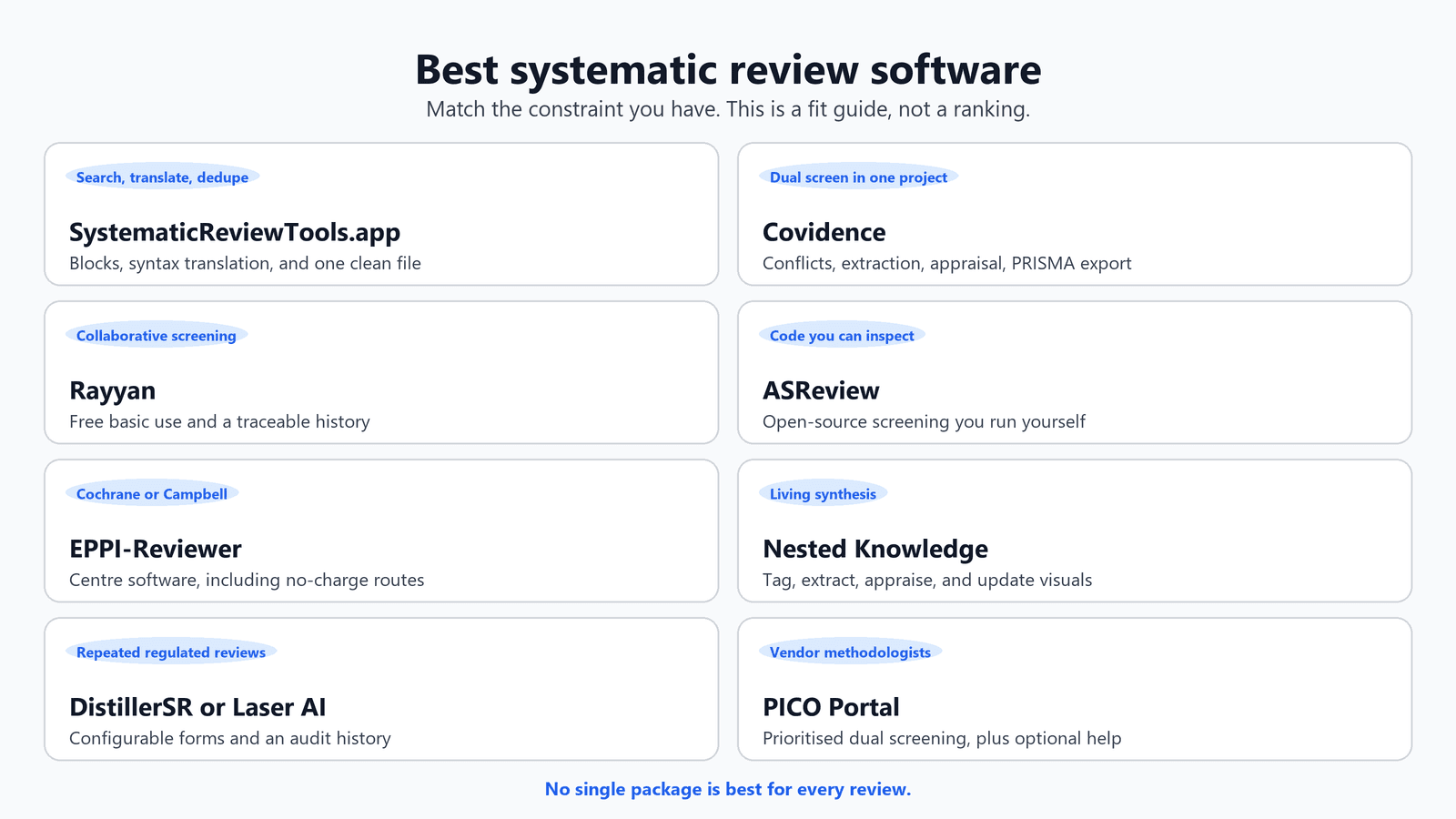
Match the constraint you actually have.
- The search is the hard part, and you are not ready to screen: Search Builder, Search Translator, then deduplication.
- You need dual screening, conflicts, extraction, and PRISMA export in one academic project: Covidence.
- You want collaborative screening, and Rayyan’s basic use fits that job: Rayyan.
- You need open code: ASReview.
- You are on a Cochrane or Campbell review: EPPI-Reviewer.
- You want tagging, quantitative extraction, and living synthesis visuals together: Nested Knowledge.
- You repeat reviews in a regulated setting and want configurable forms with an audit history in that workflow: DistillerSR or Laser AI.
- You may want the vendor’s methodologists as well as the software: PICO Portal.
Whatever you pick, register the protocol, deduplicate before screening, and keep exclusion reasons. PRISMA reporting and citation hygiene fail when those three slip, and no package repairs them after the fact.

About the Author
Connect on LinkedInGeorge Burchell
George Burchell is a specialist in systematic literature reviews and scientific evidence synthesis with significant expertise in integrating advanced AI technologies and automation tools into the research process. With over four years of consulting and practical experience, he has developed and led multiple projects focused on accelerating and refining the workflow for systematic reviews within medical and scientific research.