- search translation
- 6 min read
- By George Burchell
- View publications on PubMed
- ORCID
Switching from Polyglot to SRT
Can you move from Polyglot to SystematicReviewTools? Yes, for the translation step. Paste your PubMed or Ovid MEDLINE string into the SRT Search Translator, pick one target database, then check the output line by line. Neither tool maps subject headings for you reliably, so you still check Emtree and other thesauri by hand. Polyglot is better if you want every database at once, automatic expansion of Ovid line numbers, or a tool tested in a randomised trial. SRT adds tools around the translation: a block-based Search Builder, a search block library, RIS deduplication and a PRISMA flowchart.
This guide is for review teams who use the Polyglot Search Translator, or who translate searches by hand, and want to know what changes if they run the same work in SRT.
What Polyglot does
The Polyglot Search Translator was developed by a team at the Institute for Evidence-Based Healthcare, Bond University (Clark et al. 2020). It now lives in TERA, which replaced the Systematic Review Accelerator (SRA). The SRA site says the old Polyglot stays available but recommends the TERA version (SR-Accelerator).
According to the TERA Polyglot help page (checked 31 Oct 2026):
- It translates a PubMed or Ovid MEDLINE string into the Cochrane Library, Embase (Elsevier), Web of Science, Scopus, EBSCO (for example CINAHL), Ovid (for example PsycINFO or Embase via Ovid) and PubMed.
- You paste the string once and open each database's translation from a list.
- A "Replace Line References" option expands a numbered, line-by-line search into a single string.
- It "does not automatically map subject terms across databases (e.g. MeSH terms to Emtree terms)".
In a randomised trial, 16 participants translated searches with and without Polyglot. With Polyglot the mean time per translation was 31 minutes against 45 minutes by hand, and the mean number of errors was 8.6 against 14.6 (Clark et al., J Med Libr Assoc 2020). The authors still warn that translation errors remain a problem.
What SRT does
These points come from the SRT tool pages and the app itself:
- Search Translator. You choose a source and a target from PubMed, Embase, Web of Science, Scopus, PsycINFO, CINAHL, ERIC, Cochrane Library and OVID Medline, paste your query, and copy the result. It translates to one target per run. The translation is AI-assisted, and the tool shows a note that it can mishandle thesaurus terms, so you must check controlled vocabulary such as Emtree and MeSH yourself.
- Search Builder. It starts from a research question, splits it into aspects, and builds a block for each aspect with MeSH headings and free-text synonyms. Only MeSH headings with an official descriptor ID go into the exported search. You can view blocks in PubMed, Embase or Web of Science format and export them as Text, CSV, JSON or Word.
- Search Block Library. Pre-built PubMed blocks (MeSH plus title/abstract terms) that you search by keyword and copy into your strategy.
- Deduplication. Upload up to 10 RIS or TXT exports (50 MB combined) and download one RIS file plus an audit report.
- PRISMA flowchart generator. Enter your counts and download the diagram as PDF, PNG or SVG.
Feature map
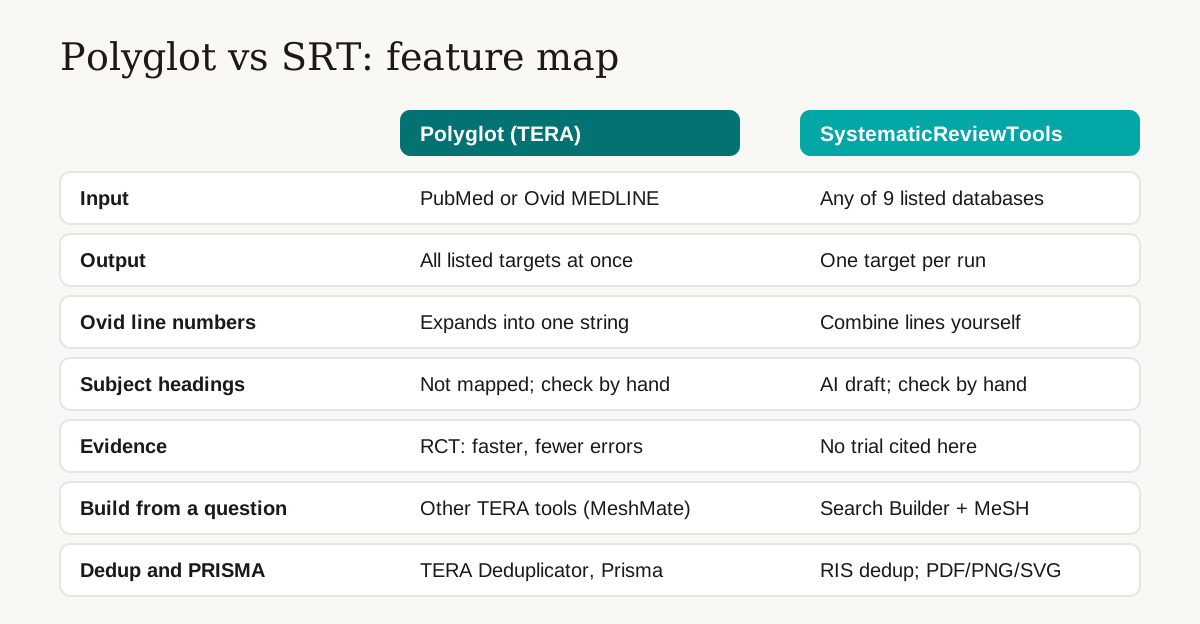
| Need | Polyglot (TERA) | SRT |
|---|---|---|
| Source syntax | PubMed or Ovid MEDLINE | Any of the 9 databases listed above |
| Targets per run | All listed databases at once | One |
| Ovid line-numbered searches | Expands line references into one string | No equivalent option; combine the lines first |
| Subject headings | Not mapped; check by hand | AI draft that can mishandle thesaurus terms; check by hand |
| Published evaluation | Randomised trial (Clark et al. 2020) | None cited here |
| Building a search from a question | Other TERA tools, such as MeshMate (TERA tools) | Search Builder with MeSH headings and synonyms |
| Deduplication and PRISMA diagram | TERA Deduplicator and Prisma tools (TERA tools) | RIS deduplication with an audit report; PRISMA flowchart in PDF, PNG or SVG |
Where Polyglot is stronger: one paste gives you every target, it handles Ovid line numbers, and its effect on speed and errors has been tested in a trial. If those matter most to you, keep using it.
Where SRT differs: it accepts more source databases, and the search blocks, deduplication and flowchart sit in the same account as the translator. That is a convenience, not proof of better translations.
How to move an existing search, step by step
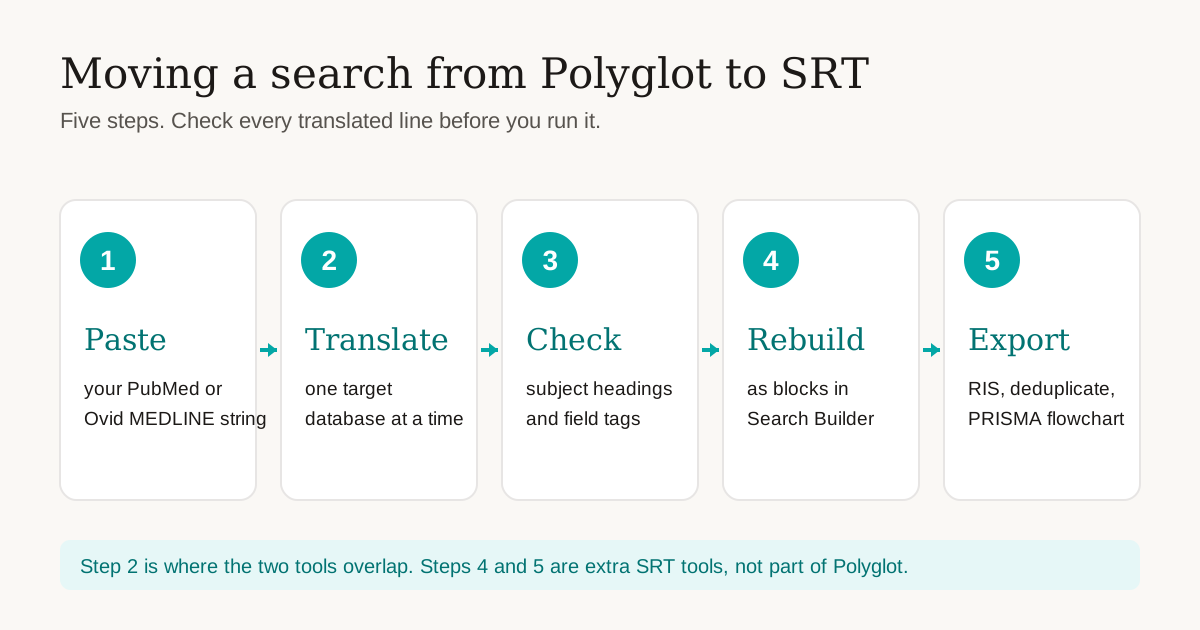
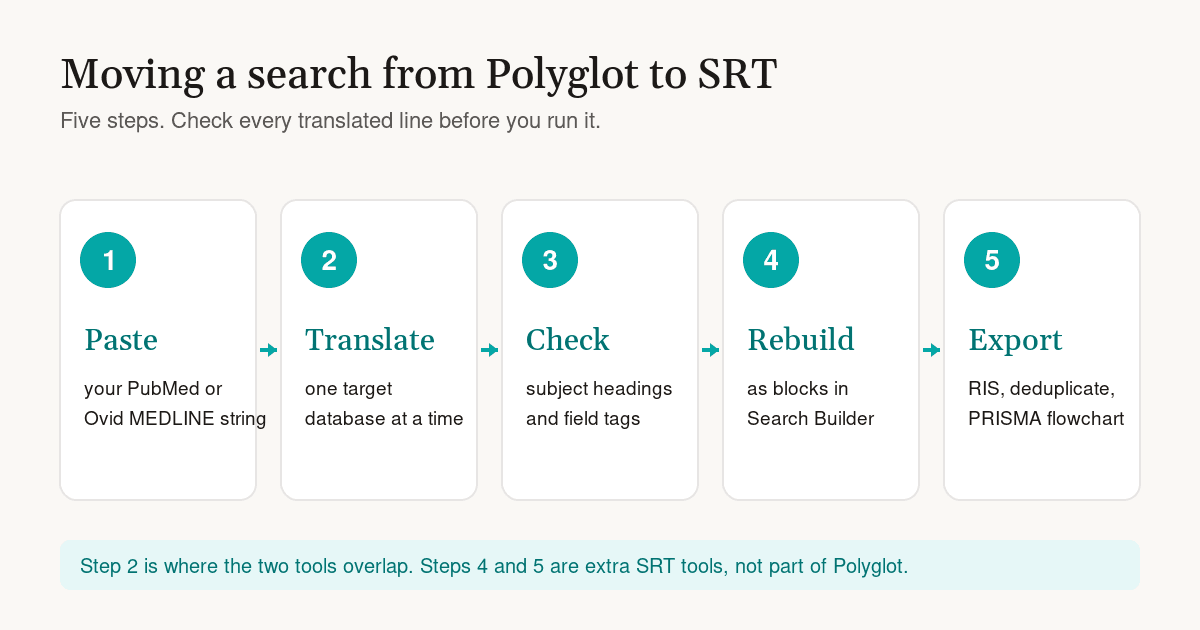
- Paste your current string. Open the Search Translator, set the source to PubMed (or OVID Medline), and paste the final search string. If your Ovid search uses line numbers such as
#1 OR #2, combine the lines into one string first. SRT has no option to expand them for you. - Translate to one database. Set the target, for example Embase, and translate. Repeat for each database you plan to search. Keep the source string and each output in your search log.
- Check every line. Compare field tags and operators with the target database's help pages. Replace MeSH headings with the right Emtree or CINAHL headings yourself. Run the search and compare the hit count with your Polyglot or manual version. If the counts differ a lot, find the line that causes it. Our guide to translating PubMed blocks for Embase, Cochrane and Web of Science lists the field tags to check.
- Rebuild the concepts as blocks (optional). Search Builder cannot import a finished string. It starts from your research question. Enter the question, keep the aspects that match your existing concepts, and compare each generated block with your own terms. You can also copy a matching block from the Search Block Library. The Search Builder worked example shows the full process. Export the blocks as Text, CSV, JSON or Word for your appendix.
- Export, deduplicate and report. Export RIS files from each database, upload them to the Deduplication tool, and keep the audit report. Enter your counts in the PRISMA flowchart generator.
What does not carry over
- No bulk translation. You run one target at a time.
- No line-reference expansion. Do this by hand before you paste.
- No subject heading mapping you can trust without checking. That is true of both tools.
- No import of Polyglot projects. Copy the strings across yourself.
If something in this guide does not match what you see in the app, contact via the contact page.

About the Author
Connect on LinkedInGeorge Burchell
George Burchell is a specialist in systematic literature reviews and scientific evidence synthesis with significant expertise in integrating advanced AI technologies and automation tools into the research process. With over four years of consulting and practical experience, he has developed and led multiple projects focused on accelerating and refining the workflow for systematic reviews within medical and scientific research.