- search syntax
- 29 min read
- By George Burchell
- View publications on PubMed
- ORCID
Database search syntax cheat sheet
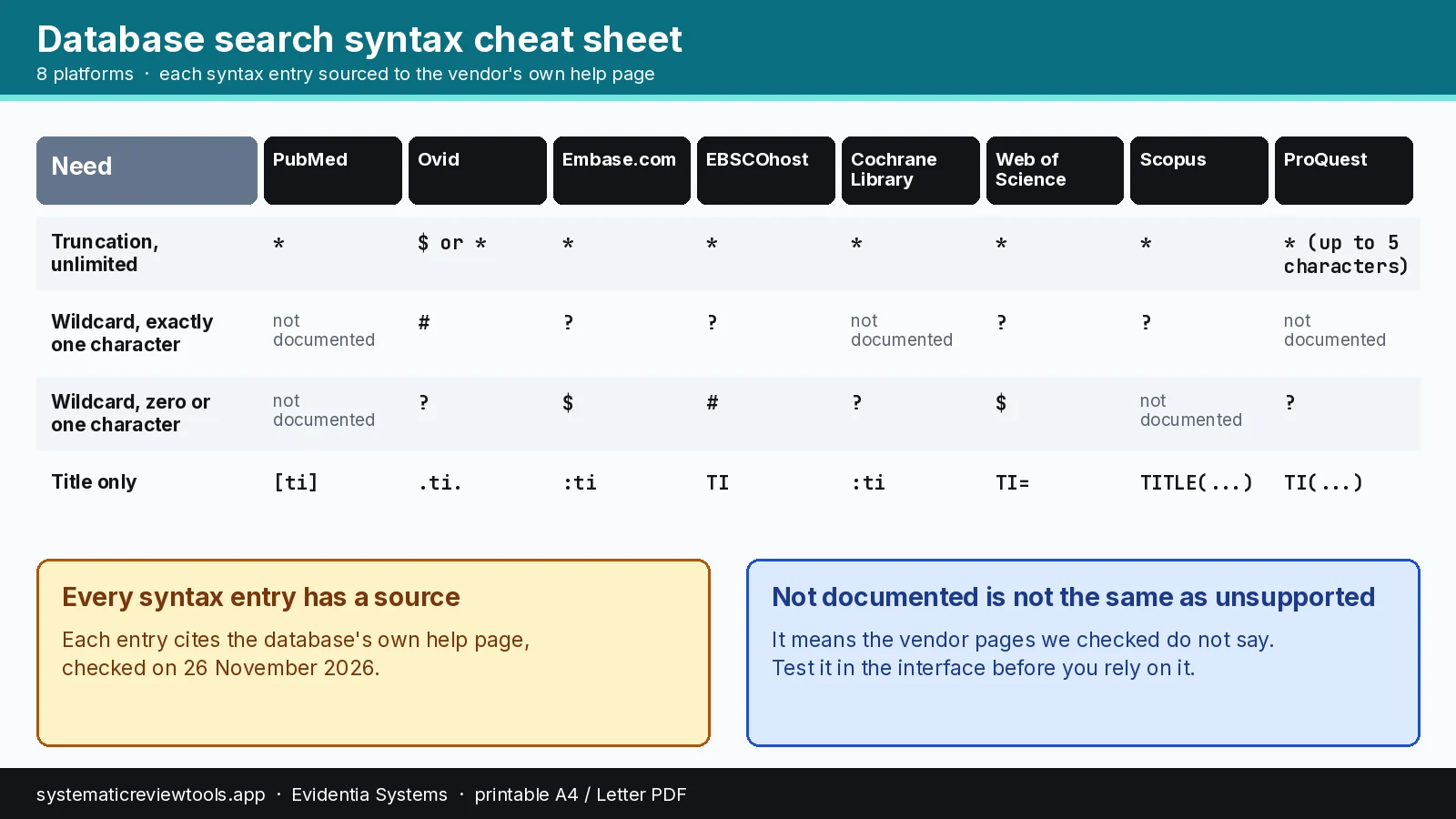
This search syntax cheat sheet covers eight platforms: PubMed, Ovid, Embase.com, EBSCOhost (CINAHL), the Cochrane Library, Web of Science, Scopus and ProQuest. Find your database in the grid, copy the syntax, and test it on the worked example in that database's section below. Every entry cites the vendor's own help page, and anything a vendor does not document says "not documented". A printable A4 landscape PDF is at the end of the page.
How to use this sheet
- Pick the platform you will actually open. MEDLINE through PubMed, Ovid and EBSCOhost is three query languages, not one.
- Find the row you need in the grid, then read the same row in that database's section for the worked example and the vendor source.
- Read the gotchas for that platform before you run the string.
- Write down the platform, the date and the exact string you ran.
The interface is not the database
The same database can sit behind different query languages, so a string that works in one interface can quietly fail in another. The how-to for rewriting a block lives in translating a PubMed block for Embase, Cochrane and Web of Science and in switching from Polyglot to SRT. This page is the reference table those posts point to.
The cheat sheet
Each cell shows the syntax only. The database sections below add a worked example, the vendor page and the section it comes from. "Not documented" means the vendor pages we checked do not describe it, not that the platform lacks it.
| Need | PubMed | Ovid | Embase.com | EBSCOhost (CINAHL) | Cochrane Library | Web of Science | Scopus | ProQuest |
|---|---|---|---|---|---|---|---|---|
| Phrase search | "phrase" | type the words with a space | 'phrase' or "phrase" | "phrase" | "phrase" | "phrase" | "loose" or {exact} | "phrase" |
| Truncation, unlimited | * | $ or * | * | * | * | * | * | * (up to 5 characters) |
| Truncation, limited | not documented | $n or *n | not documented | not documented | not documented | not documented | not documented | [*n] (n up to 20) |
| Wildcard, exactly one character | not documented | # | ? | ? | not documented | ? | ? | not documented |
| Wildcard, zero or one character | not documented | ? | $ | # | ? | $ | not documented | ? |
| Proximity, any order | "words"[field:~N] | ADJn (n = 1 to 99) | NEAR/n | Nn | NEAR/X (NEAR = 6) | NEAR/x (NEAR = 15) | W/n | NEAR/n or N/n (NEAR = 4) |
| Proximity, set order | phrase search only | ADJ | NEXT/n | Wn | NEXT | not documented | PRE/n | PRE/n, P/n or - |
| Title and abstract | [tiab] | .ti,ab. | :ti,ab | XB, or TI and AB | :ti,ab | TI=(...) OR AB=(...) | TITLE-ABS(...) | ABSTRACT,TITLE(...) |
| Title only | [ti] | .ti. | :ti | TI | :ti | TI= | TITLE(...) | TI(...) |
| Keyword or text-word field | [tw] or [ot] | not documented | :kw | not documented | :kw | TS=, AK=, KP= | KEY(...), TITLE-ABS-KEY(...) | IF(...) |
| Subject heading, exploded | [mh] | exp term | /exp | MH "heading+" | [mh term] | not documented | not documented | not documented |
| Subject heading, not exploded | [mh:noexp] | not documented as unexploded | not documented as unexploded | MH "heading" | [mh ^term] | not documented | not documented as unexploded | not documented as unexploded |
| Boolean and precedence | uppercase; left to right | left to right; parentheses | no precedence; left to right | AND before OR; parentheses | NOT, AND, OR; parentheses | NEAR, NOT, AND, OR; parentheses | OR, W/n PRE/n, AND, AND NOT; use ( ) | PRE, NEAR, AND, OR, NOT |
Syntax by database
A dagger (†) marks a worked example that is not copied from the vendor page. We built it by applying the vendor's documented syntax to a demo term.
PubMed
Interface: PubMed (NLM).
| Need | Syntax | Worked example | Vendor source |
|---|---|---|---|
| Phrase search | "phrase" If the quoted phrase is not in the phrase index, the quotes are ignored and automatic term mapping is applied. | "kidney allograft" | PubMed help, Searching for a phrase |
| Truncation, unlimited | * At least 4 characters before the first wildcard. | colo* | PubMed help, Wildcards and truncation |
| Truncation, limited | Not documented. | none | none |
| Wildcard, exactly one character | Not documented. | none | none |
| Wildcard, zero or one character | Not documented. | none | none |
| Proximity, any order | "words"[field:~N] Only in [ti], [tiab] and [ad]; terms match in any order. | "rationing healthcare"[Title:~2] | PubMed help, Proximity searching |
| Proximity, set order | use a phrase search PubMed proximity has no set-order form; a phrase search fixes the order. | "kidney allograft" | PubMed help, Proximity searching |
| Title and abstract | [tiab] | kidney allograft[tiab] | PubMed help, Using search field tags |
| Title only | [ti] | covid-19[ti] | PubMed help, Using search field tags |
| Keyword or text-word field | [tw] or [ot] [tw] covers title, abstract, MeSH terms and other fields; [ot] is the author keyword field. | kidney allograft[tw] | PubMed help, Search field tags: Text Words [tw], Other Term [ot] |
| Subject heading, exploded | [mh] Exploding is the default. | neoplasms[mh] † | PubMed help, Search field tags: MeSH Terms [mh] |
| Subject heading, not exploded | [mh:noexp] | neoplasms [mh:noexp] | PubMed help, Search field tags: MeSH Terms [mh] |
| Boolean and precedence | AND OR NOT, left to right Uppercase operators; strictly left to right; parentheses nest. | vitamin c AND common cold | PubMed help, Combining search terms with Boolean operators |
Ovid
Interface: Ovid (MEDLINE, Embase, APA PsycInfo and other databases).
| Need | Syntax | Worked example | Vendor source |
|---|---|---|---|
| Phrase search | type the words with a space No quotation marks needed; Ovid reads a space as ADJ. | blood pressure | Ovid syntax help, ADJn Operator |
| Truncation, unlimited | $ or * | gene* | Ovid syntax help, Truncation and Wild Cards |
| Truncation, limited | $n or *n | dog$1 | Ovid syntax help, Truncation and Wild Cards |
| Wildcard, exactly one character | # | wom#n | Ovid syntax help, Truncation and Wild Cards |
| Wildcard, zero or one character | ? | colo?r | Ovid syntax help, Truncation and Wild Cards |
| Proximity, any order | ADJn (n = 1 to 99) Ovid counts stopwords toward n. | physician adj5 relationship | Ovid syntax help, ADJn Operator |
| Proximity, set order | ADJ (no number) | blood adj pressure | Ovid syntax help, ADJn Operator |
| Title and abstract | .ti,ab. | heart.ab,ti. | Ovid syntax help, Command Line Syntax |
| Title only | .ti. | (pregnancy or birth).ti. | Ovid syntax help, OR Operator |
| Keyword or text-word field | Not documented. Field codes vary by database; this page defers to each database field guide. | none | none |
| Subject heading, exploded | exp term | exp neoplasms | Ovid syntax help, Command Line Syntax |
| Subject heading, not exploded | Not documented as unexploded. Closest syntax: term/ Searches a known subject heading directly, bypassing mapping. The page does not say whether narrower terms are included. | eye/ | Ovid syntax help, Command Line Syntax |
| Boolean and precedence | OR AND NOT, left to right | ((hematology and oncology) adj patient).ti | Ovid syntax help, Order of Operation |
Embase.com
Interface: Embase.com (Elsevier).
| Need | Syntax | Worked example | Vendor source |
|---|---|---|---|
| Phrase search | 'phrase' or "phrase" | 'heart attack' | Embase search help, How do I search in Embase? (Quick Search; Quotation Marks) |
| Truncation, unlimited | * Works inside quoted phrases. Leading wildcards are not allowed. | cat* | Embase operators, Wildcards |
| Truncation, limited | Not documented. | none | none |
| Wildcard, exactly one character | ? | sulf?nyl | Embase operators, Wildcards |
| Wildcard, zero or one character | $ | group$ | Embase operators, Wildcards |
| Proximity, any order | NEAR/n | cardio* NEAR/5 system* | Embase operators, Proximity Operators |
| Proximity, set order | NEXT/n | cancer* NEXT/4 cell* | Embase operators, Proximity Operators |
| Title and abstract | :ti,ab | 'heart attack':ti,ab † | Embase search help, Set your default search strategy: Free text; Embase field codes, Complete list of field codes |
| Title only | :ti | heart:ti | Embase field codes, Most commonly used field codes |
| Keyword or text-word field | :kw | aspirin:kw | Embase field codes, Complete list of field codes |
| Subject heading, exploded | /exp | 'breast cancer'/exp | Embase mapping help, Explosion search compared to other mapping options |
| Subject heading, not exploded | Not documented as unexploded. Closest syntax: /de Searches the term or its preferred Emtree term. The vendor page does not state that /de leaves out narrower terms. | 'mamma cancer'/de | Embase mapping help, Explosion search compared to other mapping options |
| Boolean and precedence | AND OR NOT, no precedence | (A AND B) OR (C AND D) | Embase operators, Boolean Operators |
EBSCOhost (CINAHL)
Interface: EBSCOhost (CINAHL). The EBSCO help articles used here are for Classic EBSCOhost. The newer EBSCOhost interface may differ, so test a line there before you rely on it.
| Need | Syntax | Worked example | Vendor source |
|---|---|---|---|
| Phrase search | "phrase" | "human rights" | EBSCO search tips, Using Quotation Marks in EBSCOhost; EBSCO XB field, Considerations when searching with XB |
| Truncation, unlimited | * At least three leading characters (from December 2025). | comput* | EBSCO wildcards, Asterisk Wildcard |
| Truncation, limited | Not documented. | none | none |
| Wildcard, exactly one character | ? | ne?t | EBSCO wildcards, Question-Mark Wildcard |
| Wildcard, zero or one character | # | colo#r | EBSCO wildcards, Hash Wildcard |
| Proximity, any order | Nn The number cannot exceed 255. | tax N5 reform | EBSCO proximity, How do I create a proximity search? |
| Proximity, set order | Wn | tax W8 reform | EBSCO proximity, How do I create a proximity search? |
| Title and abstract | XB, or TI and AB XB works in a limited set of EBSCOhost databases, including CINAHL; field codes must be uppercase. | XB (foreign N3 doctors) | EBSCO XB field, XB - Title or Abstract |
| Title only | TI | TI (foreign N3 doctors) † | EBSCO field codes, Searching with Field Codes; EBSCO XB field, XB - Title or Abstract |
| Keyword or text-word field | Not documented. | none | none |
| Subject heading, exploded | MH "heading+" | MH "arm injuries+" | CINAHL headings, Subject Heading Searching with Explosions |
| Subject heading, not exploded | MH "heading" | MH "tennis elbow" | CINAHL headings, Subject Heading Searching |
| Boolean and precedence | AND OR NOT, AND before OR | (heart OR lung) AND bypass | EBSCO Boolean, Using Booleans and Parentheses |
Cochrane Library
Interface: Cochrane Library (Search Manager).
| Need | Syntax | Worked example | Vendor source |
|---|---|---|---|
| Phrase search | "phrase" Use NEXT for a phrase that contains a wildcard. | "lung cancer" | Cochrane search help, Phrase searching |
| Truncation, unlimited | * | transplant* | Cochrane search help, Wildcard (or truncation) |
| Truncation, limited | Not documented. | none | none |
| Wildcard, exactly one character | Not documented. | none | none |
| Wildcard, zero or one character | ? | wom?n | Cochrane search help, Wildcard (or truncation) |
| Proximity, any order | NEAR/X (NEAR = 6) NEAR on its own finds terms within 6 words. | cancer near/3 lung | Cochrane search help, Proximity operators |
| Proximity, set order | NEXT | hearing NEXT aid* | Cochrane search help, Proximity operators |
| Title and abstract | :ti,ab | cancer:ti,ab † | Cochrane search help, Searching with field labels |
| Title only | :ti | "lung cancer":ti | Cochrane search help, Searching with field labels |
| Keyword or text-word field | :kw Includes MeSH terms but does not explode them. | (hearing next aid*):kw | Cochrane search help, Searching with field labels |
| Subject heading, exploded | [mh term] | [mh vaccines] | Cochrane search help, Entering a MeSH search directly in search manager |
| Subject heading, not exploded | [mh ^term] | [mh ^vaccines] | Cochrane search help, Entering a MeSH search directly in search manager |
| Boolean and precedence | NOT, then AND, then OR | (kidney OR renal) AND dialysis | Cochrane search help, Order of precedence; Nesting |
Web of Science
Interface: Web of Science Core Collection (Clarivate).
| Need | Syntax | Worked example | Vendor source |
|---|---|---|---|
| Phrase search | "phrase" | "soil drainage" | WoS search rules, Using Quotation Marks |
| Truncation, unlimited | * At least three characters before the wildcard in Title and Topic searches. | color* | WoS search rules, Wildcards |
| Truncation, limited | Not documented. | none | none |
| Wildcard, exactly one character | ? | wom?n | WoS search rules, Wildcards |
| Wildcard, zero or one character | $ | flavo$r | WoS search rules, Wildcards |
| Proximity, any order | NEAR/x (NEAR = 15) NEAR/0 means adjacent. | Beverage NEAR/5 bottle | WoS operators, Proximity Operators |
| Proximity, set order | Not documented. NEAR/x is the only proximity operator described for the Core Collection; SAME applies to Address searches only. | none | none |
| Title and abstract | TI=(...) OR AB=(...) TS= (Topic) is wider: it also searches Author Keywords and Keywords Plus. | TI=("soil drainage") OR AB=("soil drainage") † | WoS field tags, TI=Title; AB= Abstract |
| Title only | TI= | TI=("soil drainage") † | WoS field tags, TI=Title |
| Keyword or text-word field | TS=, AK=, KP= TS= searches title, abstract, author keywords and Keywords Plus; AK= searches author keywords only. | TS = (Germany NEAR/10 "monetary union") | WoS field tags, TS=Topic; AK= Author Keywords; KP= Keywords Plus; WoS operators, Proximity Operators |
| Subject heading, exploded | Not documented. The Core Collection field-tag list has no controlled-vocabulary subject-heading tag. | none | none |
| Subject heading, not exploded | Not documented. The Core Collection field-tag list has no controlled-vocabulary subject-heading tag. | none | none |
| Boolean and precedence | NEAR/x, SAME, NOT, AND, OR | (cadmium AND gill*) NOT Pisces | WoS operators, Search Operator Precedence; Use of Parentheses |
Scopus
Interface: Scopus (Elsevier).
| Need | Syntax | Worked example | Vendor source |
|---|---|---|---|
| Phrase search | "loose" or {exact} Double quotes: a loose phrase (plurals included, punctuation ignored). Braces: exact phrase. | {oyster toadfish} | Scopus search guide, Phrases |
| Truncation, unlimited | * Can also lead a term (*tocopherol). | behav* | Scopus search guide, Wildcards |
| Truncation, limited | Not documented. | none | none |
| Wildcard, exactly one character | ? | nure?berg | Scopus search guide, Wildcards |
| Wildcard, zero or one character | Not documented. The asterisk covers zero or more characters; no separate zero-or-one wildcard is described. | none | none |
| Proximity, any order | W/n | Pain W/5 morphine | Scopus quick reference, Logical operators and proximity operators |
| Proximity, set order | PRE/n | newborn PRE/3 screening | Scopus quick reference, Logical operators and proximity operators |
| Title and abstract | TITLE-ABS(...) | TITLE-ABS("heart attack") † | Scopus advanced search, All available field codes |
| Title only | TITLE(...) | TITLE("neuropsychological evidence") | Scopus advanced search, All available field codes |
| Keyword or text-word field | KEY(...), TITLE-ABS-KEY(...) KEY covers author keywords, index terms, trade names and chemical names. | TITLE-ABS-KEY("heart attack") | Scopus advanced search, All available field codes |
| Subject heading, exploded | Not documented. INDEXTERMS searches the controlled-vocabulary terms assigned to a document; the vendor pages checked do not describe exploding. | none | none |
| Subject heading, not exploded | Not documented as unexploded. Closest syntax: INDEXTERMS(...) Searches the controlled vocabulary terms assigned to the document. The vendor pages checked do not say whether narrower terms are included. | INDEXTERMS("Fluorimetric assay") | Scopus advanced search, All available field codes |
| Boolean and precedence | AND, OR, AND NOT; order per Elsevier: OR, W/n and PRE/n, AND, AND NOT Elsevier pages disagree on the order (see the gotchas), so use parentheses. | (water OR vinegar OR wine) w/5 (oil OR yogurt) | Scopus advanced search, Advanced search strategy for Proximity and Boolean operators; Scopus search guide, Proximity operators |
ProQuest
Interface: ProQuest platform (Clarivate).
| Need | Syntax | Worked example | Vendor source |
|---|---|---|---|
| Phrase search | "phrase" | "healthy eating" | ProQuest search tips, Basics |
| Truncation, unlimited | * (up to 5 characters) No unlimited form is described. Standard truncation replaces up to five characters. | farm* | ProQuest search tips, Wildcards and truncation |
| Truncation, limited | [*n] (n up to 20) | nutr[*5] | ProQuest search tips, Wildcards and truncation; ProQuest command line, Special characters for special purposes |
| Wildcard, exactly one character | Not documented. Each ? matches zero or one character; no exactly-one wildcard is described. | none | none |
| Wildcard, zero or one character | ? | nurse? | ProQuest search tips, Wildcards and truncation |
| Proximity, any order | NEAR/n or N/n (NEAR = 4) N needs a number: write N/3, not N. | nursing NEAR/3 education | ProQuest search tips, Operators, fields, and special characters |
| Proximity, set order | PRE/n, P/n or - A hyphen between two terms equals PRE/0. | nursing PRE/4 education | ProQuest search tips, Operators, fields, and special characters |
| Title and abstract | ABSTRACT,TITLE(...) | ABSTRACT,TITLE(food) | ProQuest search tips, Search fields; ProQuest field codes, Frequently used search fields |
| Title only | TI(...) | TI(food) | ProQuest field codes, Frequently used search fields |
| Keyword or text-word field | IF(...) IF is the code the field list gives for Keywords/identifiers. | IF(food) † | ProQuest field codes, Complete field list |
| Subject heading, exploded | Not documented. The pages checked show MESH(...) and a thesaurus with narrower terms, but no explode syntax. | none | none |
| Subject heading, not exploded | Not documented as unexploded. Closest syntax: MESH(...) MEDLINE only. The pages checked do not say whether narrower terms are included. | MESH(infection) | ProQuest field codes, Frequently used search fields |
| Boolean and precedence | PRE, NEAR, AND, OR, NOT | cow AND (dog OR cat) | ProQuest search tips, Operator precedence; Basics |
Gotchas, with sources
PubMed
- Proximity and truncation do not mix. If the quoted terms in a proximity search contain a wildcard (*), the proximity operator is ignored. (PubMed help, Proximity searching)
- Proximity works only in the title, title/abstract and affiliation fields. (PubMed help, Proximity searching)
- Search field tags, wildcards and phrase searches switch off automatic term mapping, so a tagged phrase will not pick up MeSH terms for you. (PubMed help, Using search field tags; Wildcards and truncation)
Ovid
- ADJn counts stopwords as words between your terms. Where the database has a stopword list, the page suggests raising n by two or three. (Ovid syntax help, ADJn Operator)
- Turn database mapping off before you truncate. With mapping on, Ovid tries to map the truncated term to subject headings and issues an error. (Ovid syntax help, Truncation and Wild Cards)
- Do not repeat words on either side of ADJn, and do not chain ADJn operators in one line. (Ovid syntax help, ADJn Operator)
Embase.com
- NEAR/1 means the two words are next to each other with no word between them. NEAR/n and NEXT/n count 'within n words'. (Embase operators, Proximity Operators)
- No Boolean operator outranks another. Embase runs parentheses first, then reads left to right, and may drop parentheses that do not change the search when it shows your history. (Embase operators, Boolean Operators)
- Leading wildcards are not allowed, and Embase advises at least three characters before a *. (Embase operators, Wildcards)
EBSCOhost (CINAHL)
- A trailing question mark is not a wildcard; EBSCOhost drops it. To use ? as a wildcard at the end of a word, put # in front of it (Monday#?). (EBSCO wildcards, Question-Mark Wildcard)
- XB (title or abstract) is not the same as TI OR AB. It is one field code, so results can differ, and a multi-word XB search can find one word in the title and another in the abstract unless you quote the phrase or use a proximity operator. (EBSCO XB field, Considerations when searching with XB)
- Field codes must be uppercase, and a two-letter search word in uppercase (SO, DE, LA) can be read as a field code. Keep search words in lowercase. (EBSCO field codes, Searching with Field Codes)
- A truncated term does not search alternate spellings or synonyms: pediatric* does not find paediatric. (EBSCO wildcards, Restrictions When Using Wildcards)
Cochrane Library
- Do not put wildcards inside a quoted phrase. Quoted wildcard phrases will not find all results. Write (heart NEXT transplant*) instead of "heart transplant*". (Cochrane search help, Errors and warnings: Warnings)
- The keyword field (:kw) includes MeSH terms but does not explode them, so it is not a substitute for an exploded [mh] line. (Cochrane search help, Searching with field labels)
- You cannot combine search lines with proximity operators such as NEAR or NEXT, and you cannot mix a line reference with free-text terms. (Cochrane search help, Lines: Combining searches)
- Precedence runs NOT first, then AND, then OR. Cochrane advises nesting with parentheses for precision. (Cochrane search help, Order of precedence)
Web of Science
- You cannot put AND inside a NEAR expression: TS = (Germany NEAR/10 (monetary AND union)) is not valid. (WoS operators, Proximity Operators)
- Quotation marks and wildcards both switch off lemmatization and spelling variants. color* finds color, colors and colorful but not colour; so search color* OR colour*. (WoS search rules, Lemmatization and Wildcards; Using Quotation Marks)
- Put NEAR in quotation marks when it appears in a source title, or the search returns an error. (WoS operators, Proximity Operators)
- Left-hand truncation needs at least three characters after the wildcard, and is not supported in All Fields searches. (WoS search rules, Right and Left-Hand Truncation)
Scopus
- Scopus does not accept AND or AND NOT inside a proximity expression: cat pre/10 (dog AND mouse) is invalid. OR is allowed. (Scopus search guide, Proximity operators)
- Do not put curly braces (exact match) next to W/n or PRE/n. Use keywords or a loose double-quoted phrase instead. {nitrous oxide} W/2 emission* returns no results and no error. (Scopus search tips, Advanced Search Dos and Don'ts)
- Do not truncate on both sides of a word: TITLE-ABS-KEY (daylight) fails or returns nothing. A wildcard also cannot stand alone. (Scopus search tips, Advanced Search Dos and Don'ts)
- The operator order differs between Elsevier pages. The Support Center and the quick reference list OR, W/n and PRE/n, AND, AND NOT; the developer search guide lists OR, AND, AND NOT and says precedence will change in 2026. Use parentheses. (Scopus advanced search, Advanced search strategy; Scopus search guide, Order of precedence rules)
ProQuest
- If you shorten NEAR to N, you must add a number (N/3). Without it, ProQuest searches for the letter N as a word. (ProQuest search tips, Operators, fields, and special characters)
- You cannot start a term with a wildcard or truncation character, and a single * or ? on its own is invalid. (ProQuest search tips, Wildcards and truncation)
- EXACT cannot be combined with * or ? on the same term. (ProQuest search tips, Operators, fields, and special characters)
- ProQuest has no stop-word list. A search for 'cat in the hat' becomes cat AND in AND the AND hat. (ProQuest search tips, Basics)
Before you run a translated search
- The platform and interface are named, for example Ovid or Embase.com, not "Embase".
- Phrases follow that platform's rule: quotes in PubMed and EBSCOhost, a plain space in Ovid, braces for an exact phrase in Scopus.
- Truncation respects the minimum stem length, and no wildcard sits inside a proximity search where the vendor forbids it.
- Each proximity number has been checked against that vendor's definition of n.
- Subject headings were looked up in that database's own thesaurus, and exploding was chosen on purpose.
- Parentheses make the Boolean order explicit wherever vendors disagree.
Worked example: one block in three syntaxes
This demo block was written for this page by applying the rows above. It is not a validated search filter, and we have not run it against the databases. The idea: randomised and randomized spellings of "trial" within a short distance of each other in the title or abstract.
| Platform | Demo string | Why it is written this way |
|---|---|---|
| PubMed | "randomized trial"[tiab:~2] OR "randomised trial"[tiab:~2] | PubMed proximity ignores a wildcard, so the spellings are listed. ~2 allows at most two words between the terms. |
| Ovid | (random* adj3 trial*).ti,ab. | adj3 allows two words or fewer between the terms, and Ovid counts stopwords toward that number. |
| Embase.com | (random* NEAR/3 trial*):ti,ab | NEAR/n takes terms within n words in either order. The distance numbers are not interchangeable across platforms, so check the vendor definition. |
Download the printable PDF
Download the cheat sheet as a PDF. It is the full grid on A4 landscape, branded Evidentia Systems, with the cite block and the last-reviewed date on it. It also prints on US Letter.
How to cite this page
Last reviewed 26 November 2026. The URL is stable and the page is updated in place, so cite the URL and the last-reviewed date. ORCID: 0000-0002-6281-4179.
APA:
Burchell, G. (2026, November 26). Database search syntax cheat sheet. SystematicReviewTools.app, Evidentia Systems. https://systematicreviewtools.app/blog/database-search-syntax-cheat-sheet
BibTeX:
@misc{burchell2026searchsyntax,
  author       = {Burchell, George},
  title        = {Database search syntax cheat sheet},
  year         = {2026},
  month        = nov,
  howpublished = {SystematicReviewTools.app, Evidentia Systems},
  url          = {https://systematicreviewtools.app/blog/database-search-syntax-cheat-sheet},
  note         = {Last reviewed 26 November 2026. ORCID 0000-0002-6281-4179}
}
Change log
- 26 November 2026: first version, eight platforms checked against vendor help pages.
Frequently asked questions
Why does a PubMed search fail when I paste it into Ovid?
Each interface has its own query language. PubMed writes title and abstract as [tiab]; Ovid writes .ti,ab. Truncation, proximity and subject headings differ too, and Ovid needs mapping off before you truncate. Rewrite the string for the platform you open.
What is the difference between ADJ, NEAR, N and W?
They are each platform’s own proximity operators. Ovid ADJn, Embase.com NEAR/n, EBSCOhost Nn and Scopus W/n match in any order. Ovid ADJ, Embase.com NEXT/n, EBSCOhost Wn and Scopus PRE/n keep your order. Check each vendor’s definition of n.
Is truncation the same in every database?
No. Most use *, but PubMed needs four characters before it, EBSCOhost three, and Web of Science three in Title and Topic searches. ProQuest’s * replaces up to five characters. Ovid and ProQuest also offer limited truncation. Check the row before you reuse a word stem.
Do I have to explode subject headings?
It depends on the platform. PubMed and the Cochrane Library explode a MeSH term by default, and you switch that off with :noexp or ^. In Ovid you type exp, in Embase.com you add /exp, and in CINAHL on EBSCOhost you add + inside the quotes.
How current is this cheat sheet?
Every entry was checked against the vendor’s help page on 26 November 2026, and the date each page shows is listed in the sources table. Vendors change their pages, so check the last-reviewed date. Anything a vendor does not document says so.
Sources and checked dates
Every cell and gotcha above traces to one of these vendor pages. The EBSCOhost pages are the help articles for Classic EBSCOhost, so the newer EBSCOhost interface may differ. A date marked "Page states" is the date the vendor page itself shows; where no date is shown, the table says so.
| Platform | Vendor page | Date shown on the page | Checked |
|---|---|---|---|
| PubMed | PubMed User Guide | Page states: Last update September 30, 2026 | 26 November 2026 |
| Ovid | Ovid: Advanced Search Techniques | No page date shown | 26 November 2026 |
| Embase.com | Can I use Boolean operators, wildcards and proximity operators in Embase? | Page states: Last updated on March 06, 2026 | 26 November 2026 |
| Embase.com | What field codes can I use in Embase? | Page states: Last updated on November 16, 2023 | 26 November 2026 |
| Embase.com | How do I search in Embase? | Page states: Last updated on November 17, 2026 | 26 November 2026 |
| Embase.com | How do I refine my search results? | Page states: Last updated on October 29, 2026 | 26 November 2026 |
| EBSCOhost (CINAHL) | How do I create a proximity search? | Page states: Oct 28, 2025 | 26 November 2026 |
| EBSCOhost (CINAHL) | Searching with Wildcards in EDS and EBSCOhost | Page states: Dec 6, 2025 | 26 November 2026 |
| EBSCOhost (CINAHL) | Searching with Boolean Operators | Page states: Oct 23, 2025 | 26 November 2026 |
| EBSCOhost (CINAHL) | Searching with Field Codes | Page states: Sep 2, 2026 | 26 November 2026 |
| EBSCOhost (CINAHL) | EBSCOhost XB Field Code: Simultaneous Title and Abstract Searches | Page states: Sep 2, 2026 | 26 November 2026 |
| EBSCOhost (CINAHL) | EBSCOhost Searching Tips | Page states: Oct 28, 2025 | 26 November 2026 |
| EBSCOhost (CINAHL) | Advanced Searching with CINAHL Subject Headings | Page states: Aug 19, 2025 | 26 November 2026 |
| Cochrane Library | Search manager help | No page date shown | 26 November 2026 |
| Web of Science | Search Operators | No exact date shown (page says: Updated 1 year ago) | 26 November 2026 |
| Web of Science | Search Rules | No exact date shown (page says: Updated 4 months ago) | 26 November 2026 |
| Web of Science | Web of Science Core Collection Advanced Search Field Tags | No exact date shown (page says: Updated 10 months ago) | 26 November 2026 |
| Scopus | How can I best use the Advanced search? | Page states: Last updated on August 24, 2026 | 26 November 2026 |
| Scopus | Search Tips: What makes a Scopus search complex? | Page states: Last updated on October 20, 2025 | 26 November 2026 |
| Scopus | Scopus Search Guide (Elsevier developer portal) | No page date shown | 26 November 2026 |
| Scopus | Scopus Quick Reference Guide (Elsevier PDF) | PDF metadata creation date: 6 April 2017 | 26 November 2026 |
| ProQuest | ProQuest Help: Search Tips | No page date shown | 26 November 2026 |
| ProQuest | ProQuest Help: Command Line Search | No page date shown | 26 November 2026 |
| ProQuest | ProQuest Dialog field codes | No page date shown | 26 November 2026 |
About this page
Evidentia Systems makes SystematicReviewTools.app and the tools mentioned here, including the Search Translator. The Search Translator rewrites a PubMed strategy for the databases listed on its tool page, which does not include ProQuest. To report a syntax change or a mistake in this sheet, contact via the contact page.

About the Author
Connect on LinkedInGeorge Burchell
George Burchell is a specialist in systematic literature reviews and scientific evidence synthesis with significant expertise in integrating advanced AI technologies and automation tools into the research process. With over four years of consulting and practical experience, he has developed and led multiple projects focused on accelerating and refining the workflow for systematic reviews within medical and scientific research.