- Systematic reviews
- 11 min
- By George Burchell
- View publications on PubMed
- ORCID
Outline generator for research paper: a PRISMA-ready workflow for your first systematic review
If you are new to systematic reviews, starting the paper can feel hard. An outline generator can help. In this guide, you will learn how to use an outline generator for a research paper that follows accepted review methods. You will also learn how to connect your outline to screening logs and evidence tables, so your draft is accurate and reproducible.
Note on standards: This article aligns with PRISMA 2020 reporting guidance and good practice from the EQUATOR Network. Always check your target journal’s instructions for authors.
Quick links to workflow tools mentioned:
- Build or refine your database queries with SRT’s Search Builder
- Translate queries across databases with SRT’s Search Translator
- See screening outputs in action (Study‑Screener demo)
- See how extracted data feed your evidence table (EvidenceTableBuilder how it works)
Why use an outline generator when you’re doing your first systematic/literature review
An outline generator is a tool (often AI‑assisted) that suggests section headings and bullet points for your paper. Used well, it helps you start fast and stay aligned with methods.
Here is the Manuscript Outline Tool.
Key benefits for first‑time reviewers:
- It gives you the full structure early. You see all required parts (Introduction, Methods, Results, Discussion, etc.) before you write sentences.
- It saves time. You move from protocol and search notes to a manuscript scaffold in minutes.
- It enforces reporting sections. If you prompt it with PRISMA items, you are less likely to forget parts like eligibility criteria or risk of bias.
- It reduces blank‑page stress. You fill in data under each bullet instead of writing from scratch.
- It improves consistency. The same headings flow from protocol to paper, which supports reproducibility.
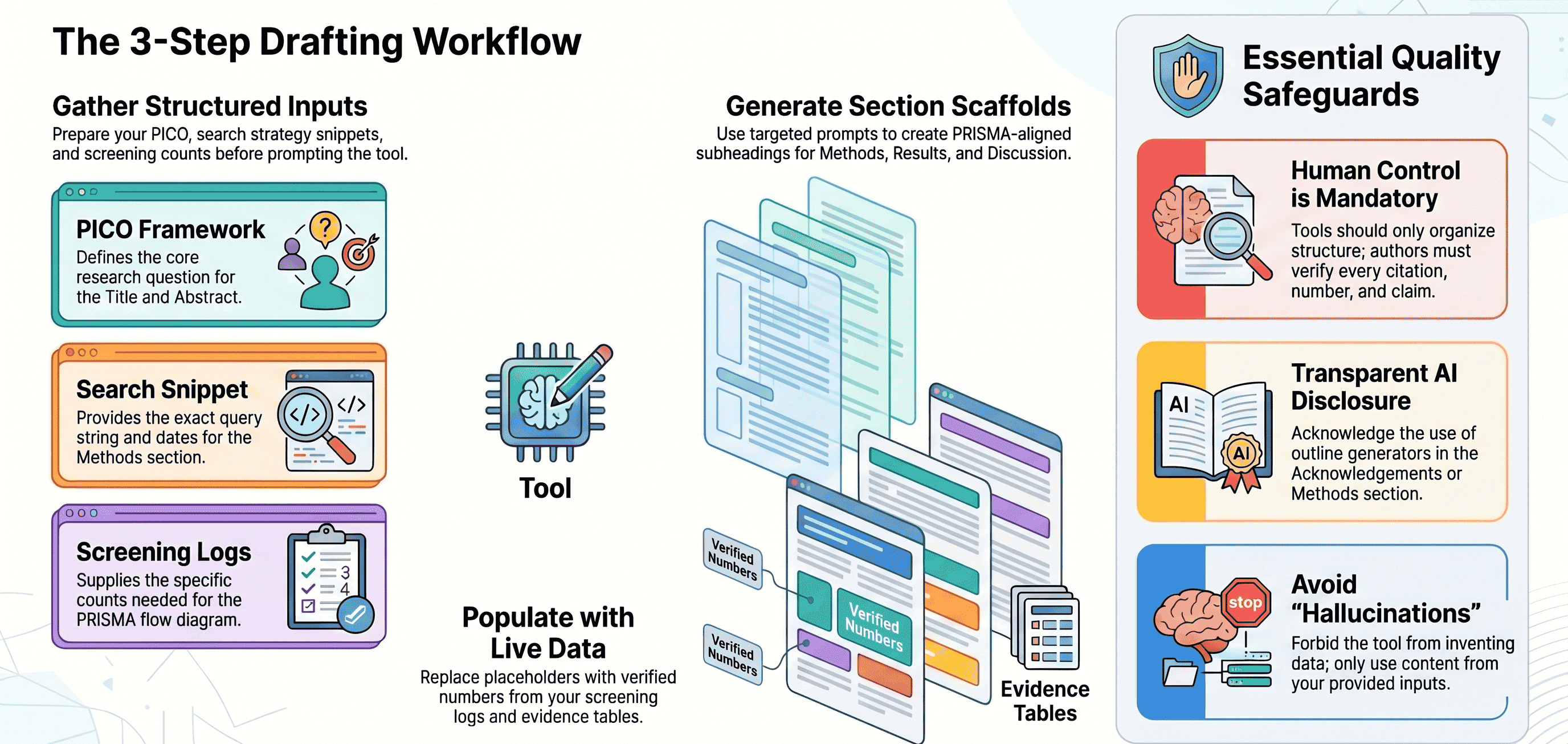
Important: An outline generator organizes. It should not invent data, studies, or citations. You control the content. Keep logs and sources for every number you insert.
What a review‑ready research paper outline looks like (template tied to systematic review methods)
A review‑ready outline maps to standard reporting items. Below is a simple template you can paste into your document or your outline tool. Each bullet includes plain‑language notes so you know what to add.
Title
- Clear, specific, includes population and intervention/exposure when possible.
- Optional tags: “Systematic review” and “Meta‑analysis” if applicable.
Abstract (structured)
- Background: 1–2 sentences on the problem and gap.
- Objective: Your review question (use PICO/PECO/PPICO where relevant).
- Data sources: Databases and dates searched.
- Study eligibility criteria: Designs, population, interventions/exposures, outcomes, language limits if any.
- Methods: Screening approach, number of reviewers, risk of bias tool, synthesis approach (narrative/meta‑analysis).
- Results: Number of records, included studies, key findings (effect size with 95% CI if meta‑analysis).
- Limitations: Main threats to certainty (e.g., heterogeneity, small studies).
- Conclusions: Short, accurate statement of what the evidence shows.
- Registration: PROSPERO or protocol DOI if registered.
Introduction
- What is known: Brief context with 2–4 key citations.
- What is not known: The gap your review addresses.
- Objective: The focused question (restate PICO).
- Why a systematic review: Rationale for method (e.g., to synthesize scattered evidence).
Methods (follow PRISMA language; explain any jargon)
- Protocol and registration: Where the protocol is available (PROSPERO/OSF) or note “no registration.”
- Eligibility criteria: Inclusion/exclusion by PICO, study design, time frame, setting, language, and publication status.
- Information sources: Databases (e.g., MEDLINE, Embase), other sources (trial registries, preprints), and last search date.
- Search strategy: Key concepts, example full search string for one database (add all full strategies in an Appendix).
- Selection process: Screening steps (title/abstract, full text), number of reviewers, conflict resolution, tools used (e.g., Study‑Screener).
- Data collection process: Extraction approach, number of reviewers, piloting, tools (e.g., EvidenceTableBuilder).
- Data items: Outcomes (define primary/secondary), effect measures (e.g., risk ratio), and covariates.
- Risk of bias assessment: Tools used (e.g., Cochrane RoB2, ROBINS‑I), how judgments were made.
- Synthesis methods: Criteria for meta‑analysis vs narrative synthesis, model (fixed/random), heterogeneity (I²), subgroup/sensitivity plans.
- Reporting bias and certainty: Funnel plots if applicable; GRADE or equivalent if used.
Results
- Study selection: PRISMA flow (numbers at each step: identified, screened, excluded, full texts, included).
- Study characteristics: Table of key features (population, intervention, comparator, outcomes, design, setting).
- Risk of bias in studies: Summary of judgments and rationale.
- Results of individual studies: Main outcome data (effect sizes, confidence intervals).
- Results of syntheses: Pooled effects, heterogeneity, subgroup/sensitivity results.
- Additional analyses: Publication bias checks, meta‑regression if performed.
Discussion
- Summary of main findings: What the evidence shows in plain terms.
- Comparison with prior research: Where your findings agree or differ.
- Strengths and limitations: Methods strengths and weaknesses; study‑level limitations.
- Implications: For practice, policy, or research.
Other required items
- Conclusions: Short, cautious takeaway.
- Funding: Sources and role of funders.
- Conflicts of interest: Disclosures for all authors.
- Data and code availability: Where to find data, extraction sheets, and code.
- Acknowledgements: Include assistance (e.g., outline generator, translators).
- References: Complete and consistent.
- Appendices: Full search strategies; list of excluded studies with reasons; additional tables/figures; PRISMA checklist.
Tip: Keep the outline headings in your document. Fill each bullet with evidence pulled from your screening logs and your evidence table.
Step‑by‑step: use an outline generator to go from protocol/search to a draft manuscript
You can get reliable results from an outline generator if you feed it structured inputs and clear prompts. Below is a simple process you can reuse.
Inputs to prepare (copy‑paste ready)
- PICO: Population, Intervention/Exposure, Comparator, Outcomes.
- Protocol abstract or summary: 150–250 words.
- Search strategy snippet: One complete query for one database (e.g., MEDLINE via Ovid), with date run.
- Screening numbers to date: Counts from title/abstract and full‑text screening.
- Extraction schema: Your data fields (e.g., author, year, sample size, outcome metric).
- Risk of bias tool planned: Name the tool (e.g., RoB2).
- Synthesis plan: Narrative only or meta‑analysis model.
Example PICO (you can adapt)
- Population: Adults with type 2 diabetes.
- Intervention: Continuous glucose monitoring (CGM).
- Comparator: Self‑monitoring of blood glucose (SMBG).
- Outcomes: HbA1c change at 6 months (primary); hypoglycemia events (secondary).
Example search snippet (include date)
- MEDLINE (Ovid), run 2026‑03‑15: (“diabetes mellitus, type 2”/ or (type 2 diabetes or T2DM).ti,ab.) AND ((continuous glucose monitor* or CGM).ti,ab.) AND (randomized controlled trial or random*.ti,ab. or clinical trial.pt.) Limits: Humans, adults.
Recommended prompts to generate an outline that matches methods
General prompt (start of session)
- “You are helping me prepare a PRISMA‑aligned outline for a systematic review manuscript. Only use the inputs I provide. Do not invent citations or numbers. Ask for missing information if needed.”
Title and Abstract prompt
- “Using the PICO and protocol summary below, draft 3 candidate titles and a structured abstract with Background, Objective, Data sources, Eligibility, Methods, Results (placeholders for counts/effect sizes), Limitations, Conclusions, and Registration. Use plain language. Keep the abstract under 300 words. Inputs: [paste PICO] [paste protocol abstract]”
Introduction prompt
- “Propose an Introduction outline with 4–6 bullets: context (with 2–4 placeholder citations), gap, objective (PICO restated), and why a systematic review is needed. Do not write full paragraphs yet.”
Methods prompt
- “Create Methods subheadings and bullet prompts for: Protocol/registration; Eligibility criteria; Information sources; Search strategy; Selection process; Data collection process; Data items; Risk of bias; Synthesis methods; Reporting bias and certainty. Use my inputs. Inputs: [paste search snippet] [state screening approach and tools] [state extraction plan and risk of bias tool] [state synthesis plan]. Include exact places where I should insert the full search string and dates.”
Results prompt
- “Draft Results section bullets that reference the PRISMA flow, study characteristics table, risk of bias summary, individual study results, and synthesis outcomes. Insert [PLACEHOLDER] tags for numbers that will come from screening logs and the evidence table.”
Discussion and other items prompt
- “Provide bullet prompts for the Discussion (main findings, comparison with prior work, strengths/limitations, implications), Conclusions, Funding, Conflicts, Data/code availability, and Appendices (full search strategies, list of excluded studies, PRISMA checklist).”
How to fill the placeholders with real data
- Use your screening dashboard for counts. If you use Study‑Screener, open the demo dashboard to see where each number appears in the PRISMA flow.
- Fill study characteristics and outcomes from your evidence table. If you use an evidence table builder, see how extracted fields map to the Results section on EvidenceTableBuilder how it works.
- Keep effect sizes and confidence intervals consistent with your analysis script. Save the script and version number, and cite it in Data and code availability.
Quality checks to preserve methodological rigor
- No invented numbers. Every count and effect must trace back to a source (screening log, extraction sheet, or analysis output).
- Reproducibility: Include exact search strings and dates in an Appendix. Tools like SRT’s Search Builder and Search Translator help you share precise queries across databases:
- Cite‑checking: Verify every citation exists and matches the claim. Do not let the generator suggest references.
- Avoid overclaiming: Use cautious language (may, suggests) when certainty is low or heterogeneity is high.
- Authorship integrity: Generators cannot be authors. Record how you used the tool and acknowledge it transparently (see Ethics section).
- PRISMA coverage: Tick off each item in the PRISMA 2020 checklist before you convert bullets to prose.
Common mistakes when prompting
- Vague inputs (“write an intro about diabetes”) cause generic, non‑PRISMA outlines.
- Mixing narrative reviews and systematic reviews. State upfront that you followed systematic methods.
- Forgetting to specify the number of reviewers for screening/extraction. Add this in your Methods bullets.
Integrating the outline with your review workflow (screening, evidence tables, and citation exports)
Your outline becomes powerful when it pulls directly from your workflow data. Here is how to connect parts.
Screening into Methods and Results
- Selection process (Methods): Export your screening workflow description. Name the tool (e.g., Study‑Screener), number of reviewers, conflict resolution method, and screening dates. See the Study‑Screener demo dashboard for where to get these fields.
- Study selection (Results): Copy exact PRISMA counts from your screening dashboard. Use the same numbers in the flow diagram and in text to avoid inconsistencies.
Extraction into Results
- Study characteristics: Generate your evidence table from your extraction tool. The EvidenceTableBuilder how it works page shows how fields like population, intervention, comparator, outcomes, and effect measures map to a clean evidence table.
- Risk of bias: Export judgments and summarize them (e.g., “3 of 10 RCTs had high risk due to missing outcome data”).
- Synthesis: Pull pooled estimates and heterogeneity statistics from your analysis script or software. Paste values into the [PLACEHOLDER] spots in your outline.
Search strategy into Methods and Appendix
- Build precise queries with SRT’s Search Builder, then translate them across databases with SRT’s Search Translator to avoid manual errors:
- Save each query, platform, and run date. Paste one full strategy in Methods, and all strategies in the Appendix.
Citation management and exports
- Keep a master library (e.g., in Zotero/EndNote). Export citations for:
- Included studies (main References).
- Excluded studies with reasons (Appendix).
- Related reviews and background sources (Introduction).
- Use consistent styles. Many journals require specific reference styles (e.g., Vancouver).
Versioning best practices
- Name files with dates and versions (e.g., outline_v0.3_2026‑04‑02.docx).
- Keep a changelog in your manuscript or repository (e.g., OSF or Git).
- Lock data snapshots (screening export v1, extraction sheet v2, analysis v1). Reference these in Data and code availability.
Tip: Treat every number in the outline as “live‑linked” to a source. If a number changes in your screening or evidence table, update it everywhere.
Limitations, ethics, and reviewer checklist before submission
AI tools are helpful, but they come with responsibilities. Keep these limits and ethics points in mind.
Limitations of outline generators
- Hallucinations: Tools may invent citations, numbers, or quotes. Never accept unverified content.
- Overconfidence: Tools can produce polished text that masks uncertainty. Your job is to reflect true certainty.
- Scope drift: Generic outlines can pull you away from your protocol. Keep your protocol next to you.
Ethics and transparency
- Authorship: Follow ICMJE criteria. Tools do not qualify as authors.
- Acknowledgement: If you used an outline generator, say so in Acknowledgements or Methods (e.g., “We used an AI‑assisted outline to draft section headings; all content and analyses were produced and verified by the authors.”).
- Data privacy: Do not paste confidential manuscripts or patient data into online tools.
- Plagiarism: Write in your own words. Cite all sources you summarize.
- Journal policies: Check COPE and your target journal’s AI disclosure rules.
Reviewer checklist (PRISMA‑aligned, quick scan)
- Title says “Systematic review” (and “Meta‑analysis” if applicable).
- Abstract includes objective, data sources, eligibility, methods, key results, limitations, and registration.
- Methods state protocol/registration, full eligibility criteria, all databases, dates, selection and extraction processes, risk of bias tool, and synthesis plan.
- Results present PRISMA flow numbers, study characteristics, risk of bias, and synthesis results with appropriate statistics.
- Discussion covers findings, limitations, and implications without overclaiming.
- All appendices present: full search strategies, excluded studies with reasons, PRISMA checklist.
- Funding, conflicts, and data/code availability statements are complete.
- Every number in the paper can be traced to a log, table, or script.
Common mistakes before submission
- Missing full search strategies. Fix by pasting your saved queries (use the Search Builder / Search Translator exports).
- Inconsistent screening counts between text and figure. Fix by copying from a single source of truth (screening dashboard).
- Calling a tool a “co‑author.” Fix by moving it to Acknowledgements with a clear description.
- Forgetting certainty judgments. If you use GRADE or similar, include it and its methods.
FAQ: outline generator for research paper
Q1. What is an outline generator for a research paper?
- It is a tool that creates a structured list of headings and bullets for your manuscript. For systematic reviews, it should reflect PRISMA sections and your protocol.
Q2. Is it okay to use an outline generator for a systematic review?
- Yes, if you control the content. Use it for structure. Do not let it invent data or citations. Disclose your use per journal policy.
Q3. Can an outline generator perform meta‑analysis for me?
- No. It can remind you where results go. Calculations must come from statistical software or scripts you run and can reproduce.
Q4. How do I avoid AI hallucinations in my outline?
- Feed the tool your PICO, protocol summary, and search snippet. Use prompts that forbid invention. Replace every [PLACEHOLDER] with verified data from your screening logs and evidence table.
Q5. How do I connect my screening and extraction data to the paper?
- Use your screening dashboard (for PRISMA counts) and your evidence table exports (for study characteristics and outcomes). See the Study‑Screener demo and EvidenceTableBuilder how it works to learn where these fields live.
Q6. What is a “quality review tool,” and do I need one?
- It is any software that supports standardized, transparent steps in a review (e.g., search builders, screening platforms, risk of bias checkers). Using a quality review tool helps reduce errors and improves reporting. On SRT you can find options such as the Search Builder and Search Translator to improve your search methods.
Q7. Do I need to register my review?
- Many journals prefer registered protocols (e.g., PROSPERO, OSF). Registration improves transparency. Mention the registration in your Abstract and Methods.
Disclaimer: This guide is educational and does not replace your supervisor’s advice, a statistician’s input, or your journal’s author instructions. Always follow PRISMA 2020 and any specific methodological guidance for your field.

About the Author
Connect on LinkedInGeorge Burchell
George Burchell is a specialist in systematic literature reviews and scientific evidence synthesis with significant expertise in integrating advanced AI technologies and automation tools into the research process. With over four years of consulting and practical experience, he has developed and led multiple projects focused on accelerating and refining the workflow for systematic reviews within medical and scientific research.